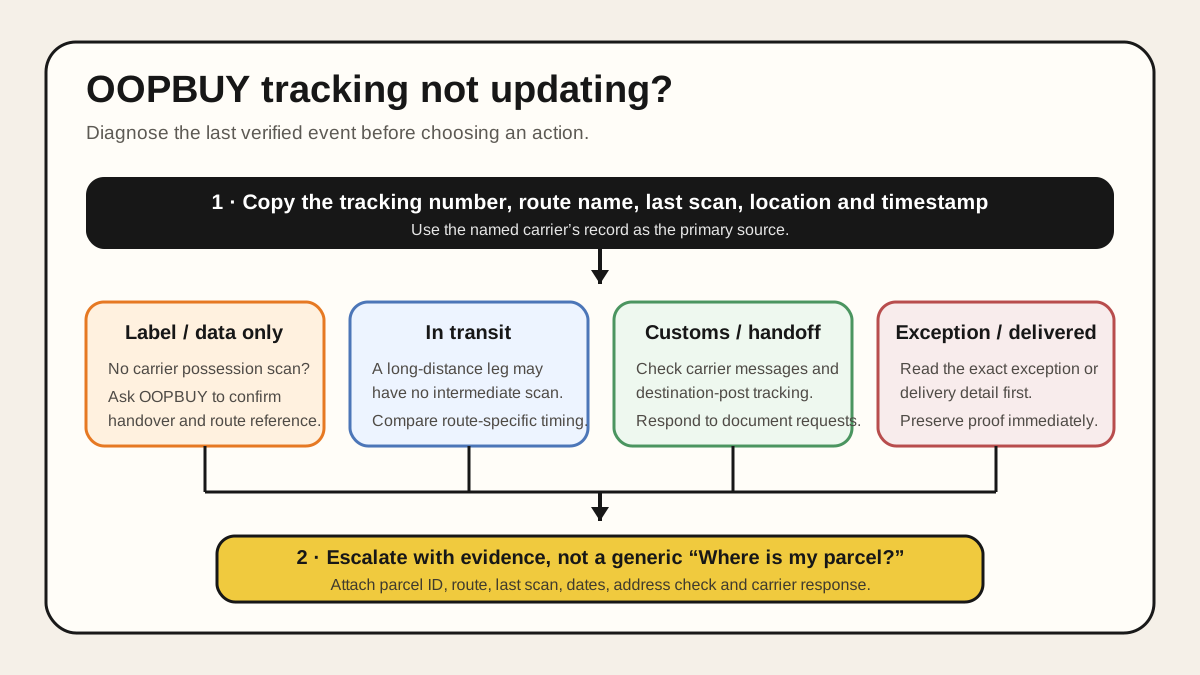
When OOPBUY tracking is not updating, the useful question is not “How many days has it been?” It is “Who recorded the last event, what did that event prove, and what action does the selected route require?” A tracking number can exist before a carrier possesses the parcel. A parcel can also move between hubs without a public scan, wait for a cross-border data handoff, enter customs processing, or encounter an exception that needs an immediate response. Those situations look similar on a quiet tracking page but require different decisions.
Which tracking number do you have?
If the number came from the seller’s dispatch or a purchase order, follow it to the receiving warehouse. If you submitted an international parcel, use the number attached to that parcel and the carrier named on its record. One domestic delivery scan can mark the end of the first journey while your international parcel has yet to be created.
Find the OOPBUY parcel tracking number first
OOPBUY's published Beginner's Guide points to My Waybill → Waybill Details after shipment. Open the relevant parcel record, confirm the current labels in your account and copy the tracking number together with the selected carrier. Compare that record with the carrier's own tracking information. Keep the domestic seller shipment separate: it covers delivery to the warehouse, not the later international parcel.
Before international dispatch, use the warehouse arrival checklist to identify whether the item is still in the receiving or QC stage. For a US-bound parcel, the USA shipping guide explains the remaining delivery stages. Menu-path source reviewed October 5, 2026; carrier examples below retain their original source dates.
01 · Start with what the record proves
The direct answer: identify the last authoritative event
Open the parcel record and write down five fields before doing anything else: the OOPBUY parcel ID, international tracking number, selected route, last visible status, and the timestamp and location of that event. Then determine whether the event came from OOPBUY, a logistics aggregator, the export carrier, or the destination carrier. The named carrier’s own system is normally the strongest public record for possession and movement; an aggregator is useful for finding handoffs but may repeat delayed or translated data.
The central distinction is simple: electronic shipment information is not the same as a physical acceptance scan. UPS explains that “Label Created” means it has received shipment details and billing information; the status changes after UPS has possession and movement begins. DHL similarly says tracking generally appears after a shipment reaches its facility. Those are carrier-specific explanations, not proof that an OOPBUY route uses UPS or DHL, but they show why a number alone does not establish handover.
02 · Read the stage, not your anxiety
What common tracking stages actually prove
Label created, shipment information received, or data submitted proves that a record exists. It may not prove the logistics provider has collected the parcel. Check for a later pickup, acceptance, origin-facility or departure event. If none exists, ask OOPBUY to confirm the physical handover date and the correct carrier reference rather than asking customs where the package is.
Accepted, picked up, departed, or in transit proves the carrier has recorded possession or movement. A quiet period after that scan can be consistent with a long-distance leg. UPS explicitly notes that long-distance shipments may not be scanned again until they reach the destination hub. That means “no new scan” and “not moving” are not equivalent. Compare the elapsed time with the selected route’s current estimate and service notice, not a timetable copied from a different line.
Airline, linehaul, destination arrival, or handed to local carrier may expose two tracking systems. Keep the original number, but look for a linked last-mile number or the destination post named in the tracking details. The Universal Postal Union’s transport systems use electronic messages and receptacle scans between operators; public customer tracking can therefore be less granular than the operational movement behind it.
Customs presented, clearance processing, held, or information required does not automatically mean seizure. For US-bound internet purchases, CBP says the carrier physically controls door-to-door goods during clearance and advises consumers to contact the carrier first; CBP accounts for packages it has actually detained or seized. Other countries have different agencies and processes, so follow the destination carrier’s notice and local authority instructions rather than applying US rules globally.
Exception, attempted delivery, returned, or delivered requires the exact detail, not a generic tracking guide. An exception means an unexpected event may change delivery timing; it is not a diagnosis by itself. For “delivered” with no parcel present, preserve the timestamp, delivery location or photo, and address confirmation immediately, then follow the carrier’s current missing-delivery process.
03 · Use five checks in order
A practical diagnosis when OOPBUY tracking is not updating
First, validate the identifiers. Copy rather than retype the international number. Confirm it belongs to the same OOPBUY parcel, route and destination. Remove accidental spaces. If OOPBUY shows an internal parcel number and a carrier number, do not assume both work on public tracking sites.
Second, find the responsible network. Use the carrier or postal operator named in the route or latest scan. Check its official tracking page. A universal tracker can help reveal a destination handoff, but it should not outrank a carrier’s own exception detail or document request.
Third, measure from the last meaningful event. “Parcel submitted” is an OOPBUY workflow event; “accepted by carrier” is a logistics event. Record the exact time between them. Once acceptance appears, compare progress with the selected route’s live estimate and advisories. This guide intentionally gives no fixed “panic after X days” rule because express, postal, duty-handled and economy lines do not share one scan pattern or service commitment.
Fourth, look for an action request. Search email, SMS, the OOPBUY parcel record and the carrier page for address corrections, import tax, identity, invoice or delivery instructions. Verify the message through an official site before paying or uploading documents; a tracking-themed message can be phishing.
Fifth, preserve a dated snapshot. Save the route, last scan and any notice.
04 · Escalate to the party that can act
When and how to escalate a quiet parcel
Start with OOPBUY when there is no physical carrier acceptance, the number is invalid on the named network, the route name is unclear, or the parcel record and tracking record conflict. Ask a specific question: “Please confirm the physical handover date, logistics provider and carrier tracking number for parcel [ID]. The latest public event is [status] at [time].” That is more actionable than “Where is it?”
Contact the carrier when it has possession and shows an exception, address problem, customs document request, attempted delivery or delivery dispute. Use the exact service channel shown on the carrier’s official domain. If a destination partner has taken over, the original carrier may direct you to that partner.
Return to OOPBUY for an insurance or compensation path only after reading the current route terms and OOPBUY’s current “Apply for Aftersales” or insurance notice. Coverage, evidence deadlines and exclusions can differ by route and event. This article does not claim that a silent scan, customs delay, damage or delivery dispute is automatically covered.
| Last verified state | Best first contact | Evidence to include |
|---|---|---|
| Data or label only | OOPBUY | Parcel ID, route, number, creation time |
| Carrier accepted; no new scan | Named carrier after its route-specific threshold | Acceptance scan, elapsed time, service estimate |
| Customs information requested | Carrier or named customs channel | Official notice, invoice/value documents requested |
| Exception or attempted delivery | Destination carrier | Exception code, address check, contact attempt |
| Delivered but missing | Destination carrier, then current aftersales path | Delivery record, location/photo, prompt report |
05 · One quiet page, two different outcomes
A worked example without invented delivery promises
Imagine Parcel A shows “shipment information received” and nothing later. The useful action is to verify physical handover with OOPBUY because the record does not yet prove carrier possession. Imagine Parcel B shows an origin acceptance and departure scan, followed by no public update during an international leg. The action changes: confirm the route estimate and advisories, check for a destination tracking partner, and avoid opening a loss claim solely because intermediate scans are absent.
If Parcel B later shows “clearance information required,” the quiet period is no longer the main issue. The document request is. If it shows “exception—address incomplete,” correct the address through the official carrier channel. The same number of silent days can therefore represent four different problems. Status evidence, not a borrowed countdown, determines the next step.
06 · Build a claim-ready record
OOPBUY parcel tracking evidence checklist
- OOPBUY parcel ID and selected international route
- International tracking number copied exactly
- Named carrier and any destination-partner number
- Last status, location and timestamp
- Screenshot of the official carrier page with the date visible
- Current route estimate or service notice from the parcel record
- Destination address check without sharing it publicly
- Any customs, tax, identity or delivery notice
- Dates and reference numbers for support contacts
- Current insurance or compensation terms, if relevant
Keep this record private. Do not post a full tracking number, address, phone number or customs document in a public review. Redact identifiers if you later describe the experience.
Sources · checked July 29, 2026
Evidence and limits
OOPBUY — “Track My Parcel” public notice
Supports the existence of OOPBUY’s parcel-tracking help path. The article does not link to OOPBUY and does not treat the notice as independent proof of delivery performance.
OOPBUY — current public product and proxy-shopping pages
Supports the seller-to-warehouse and warehouse-to-destination workflow, international shipping stage, QC fields and platform risk notices. Checked across accessible public pages.
UPS — Understanding Tracking Status
Supports the distinction between label creation, carrier possession, long-distance scan gaps and exceptions. UPS definitions apply to UPS shipments, not every OOPBUY route.
DHL — Tracking Status Explained
Supports carrier-stage interpretation such as shipment information received, sort-facility arrival and departure. DHL terms apply only when DHL is the responsible network.
UPU transport data guidance and US CBP internet-purchase guidance
Supports the role of cross-operator electronic data and the US-specific advice to contact the carrier first during clearance. CBP guidance is not a worldwide customs rule.
Plan the parcel before you need to troubleshoot it.
Use the OOPBUY shipping guide to compare weight, dimensions and route restrictions, or review the parcel consolidation decision guide before submission.